Bringing a Consistent Experience
Today, my Personal Website has yet again received an update. This time, the focus was to improve consistencies across the site. With the launch of the 2 Web Apps - Buszy and RailBuddy, it was crucial to ensure a seamless and cohesive user experience. Hence, I've decided to port over the design elements from the Web Apps to the main website.


Web Apps the main focus
The exploration and development of Web Apps have been at the forefront of my design strategy. With vibecoding being the current in-thing, I decided to build 2 web apps - one for bus timings and another for rail travel. Hence, to accomodate these focus, I ensured that the design elements from the Web Apps were seamlessly integrated into the main website.
- Mobile Site acting like a native-app: I explored various design trends and gathered inspiration from leading tech companies, just like during 6.0's development. For 6.1, I've decided to adopt Samsung's One UI 8.5 Mobile Operating System as the design reference.
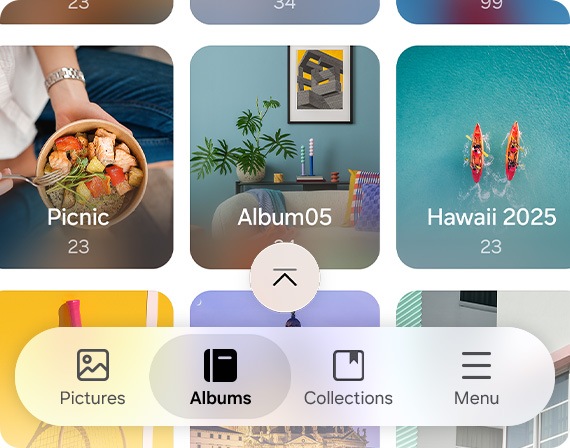
One UI 8.5's Bottom Navigation
Updated Colour Schemes

Most of the colours remain unchanged, but I introduced a new colour palette to distinguish between the Main Website, Buszy and RailBuddy.
Changes & Improvements
Simplified Navigation Menus
To align with the design trends and inspirations mentioned above, I wanted to create a more streamlined and user-friendly navigation experience.
The Navigation Bar has been redesigned to be more intuitive and accessible, with a focus on improving the overall user experience. The new design incorporates a cleaner layout, enhanced responsiveness for mobile devices, and a more visually appealing aesthetic that complements the overall look and feel of the website.

Current Design (V6)

New Design (V6.1)
Enhanced Home Page
Small tweaks were made to make the home page more visually appealing and to make my Featured Works stand out.

Current Design (V6)

New Design (V6.1)
New Bottom Navigation Bar for Mobile Devices
Navigation Menu capped at only 4 links. The rest are placed in the new Menu Page. This move aims to simplify the navigation experience on mobile devices.

Version 6.1's Bottom Navigation

Version 6.1's New Menu Section
Other Notable Improvements
- Font Awesome Version has been updated to the latest version (7.2.0).
- First time users, the Website Theme now follows the system theme by default.
- Floating Breadcrumb Navigation when in Mobile.
- Fixed unresolved broken links previously.
- Videos play on scroll, to optimize performance.
- Improved Back To Top button logic.
- Added a new Apps Section in Menu to integrate the new Web Apps.
Summary
In summary, Version 6.1 focused on updating the website's design, performance, and functionality, with the launch of the 2 new Web Apps.
I also wanted to bring a more consistent experience across all platforms, and as such, the design of the website has been updated to be more in line with the design trends and inspirations mentioned above. The navigation menus have been simplified for easier access, and the dark mode has been enhanced for a better user experience. Additionally, a new bottom navigation bar has been added for mobile devices, making it easier to navigate the website on smaller screens.